

Pinterest SEO is how you help Pinterest understand your content and match your Pins with relevant searches. For bloggers, that means looking beyond the Pin itself: your keywords, boards, profile, visuals, and destination pages all help communicate what your content is about.
1. What Is Pinterest SEO?
Pinterest SEO means optimizing your profile, boards, Pins, and linked pages so Pinterest can analyze visual content, but the text around a Pin also helps provide context. Titles, descriptions, board names, and the linked page all help clarify what the content is about.
That makes Pinterest different from a follower-based feed. Much of its discovery comes from search and recommendations, and people often arrive planning something.
Pinterest can read images to a degree, but text still carries a lot of weight: titles, descriptions, board names, and the page a Pin links to all help it classify your content.
Pinterest SEO shares some principles with Google SEO, particularly relevance and search intent, but the two platforms work differently. Google primarily returns web pages in text-based search results, while Pinterest combines search with visual discovery. For bloggers, that means the keywords behind a blog post can also inform the Pins that promote it.
2. How Pinterest Search Works
Pinterest doesn’t publish a complete ranking formula, so you’ll find plenty of theories about what its algorithm prefers. It’s useful to separate what Pinterest has actually said from what marketers have inferred from their own experience.
Reasonably supported (Pinterest’s guidance and broad agreement across sources):
- Relevance: Pinterest matches searches to Pins using the words around them and what it understands from the image. Vague descriptions match fewer searches.
- Quality: Pinterest’s business help advises high-quality images or videos.
- Original content: Its guidance asks creators to publish original content regularly and avoid duplicate Pins.
- User behavior: Saves, clicks, and other interactions can provide useful signals about how people respond to Pins, although Pinterest does not publish the weighting of individual signals.
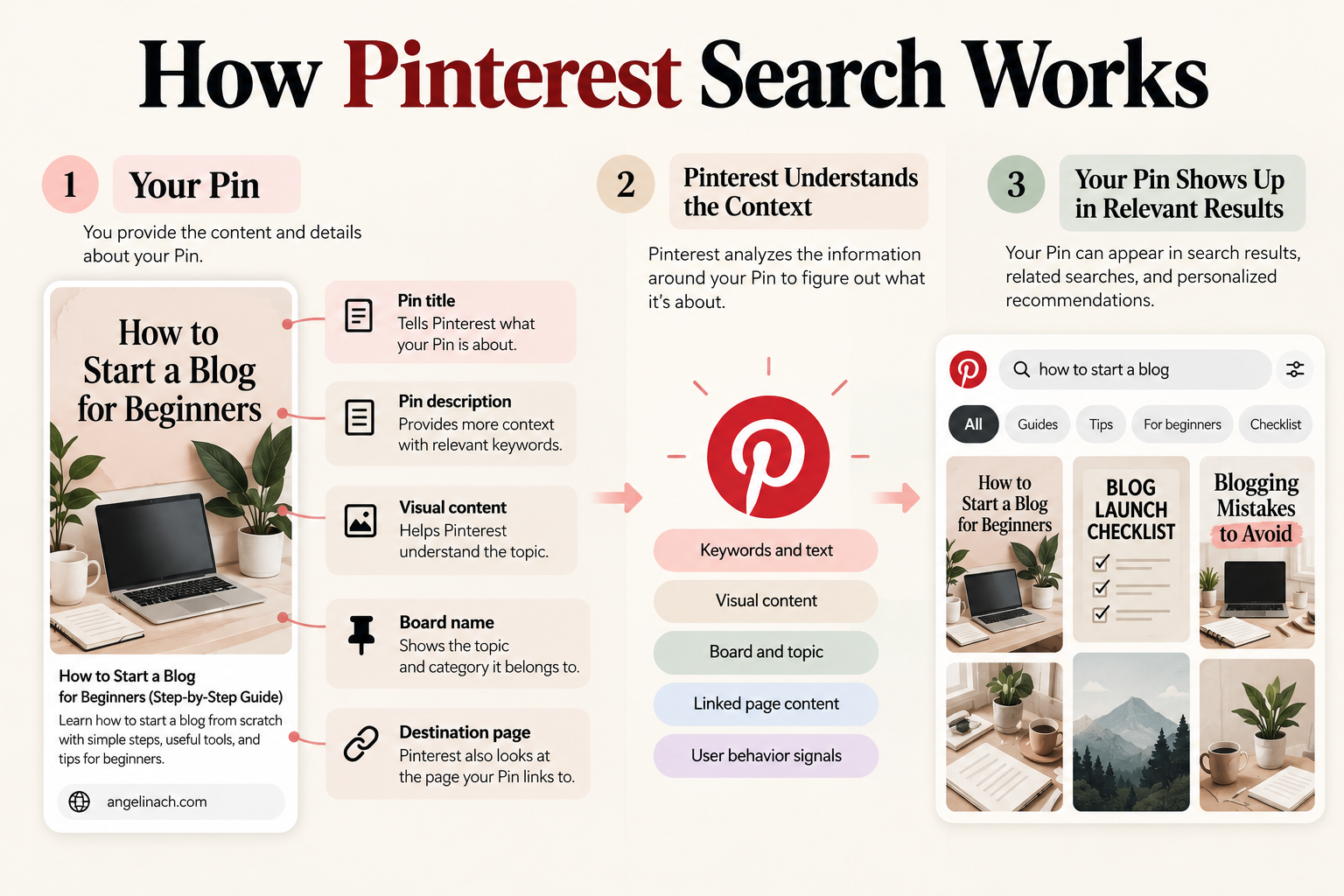
Third-party theory (treat cautiously): fixed rankings of signals (such as domain quality above Pin quality), specific update dates, short post-publication “visibility windows,” and claims that one poor site can suppress an entire account. Pinterest hasn’t documented these in the sources reviewed.
The practical takeaway is simple: make it obvious what your Pin is about.
3. How to Do Pinterest Keyword Research
Pinterest keyword research is less about volume and more about how people phrase what they want.
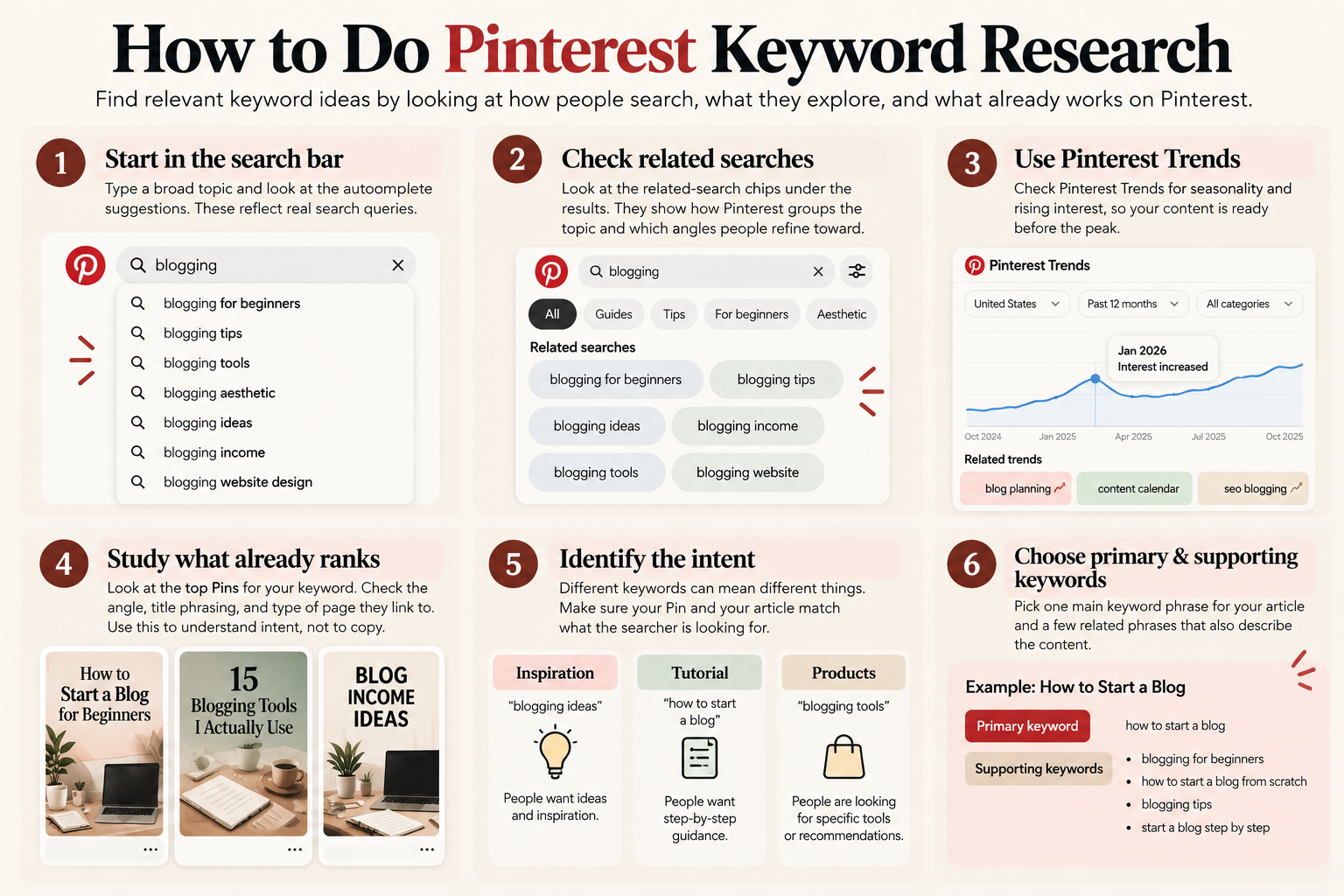
- Start in the search bar. Type a broad topic and note the autocomplete suggestions. These reflect real phrasing patterns.
- Read the related-search chips under the results. They show how Pinterest groups the topic and which angles people refine toward.
- Check Pinterest Trends for seasonality and rising interest, so seasonal content is ready before the peak.
- Study what already ranks. Look at the angle, title phrasing, and type of page the top Pins link to. Use this to understand intent, not to copy.
- Identify the intent. “Meal prep ideas” wants inspiration. “How to meal prep for a week” wants a tutorial. “Meal prep containers” wants products. The Pin and the page both need to fit.
- Choose one primary phrase and a few supporting phrases per article.
The most important rule is simple: only use a keyword when it genuinely describes the content. A Pin about beginner budgeting that also lists “frugal living, savings hacks, money tips” sends mixed signals. If a term doesn’t describe the page, leave it out.
Suppose you’re writing about starting a blog. Instead of targeting only “blogging,” you might discover more specific phrases such as “how to start a blog,” “blogging for beginners,” or “how to start a blog from scratch.” The best choice depends on what your article actually answers.
The same principle applies to Google keyword research: the keyword should reflect the problem the article actually solves. See my guide to how to do keyword research for a new blog for a deeper look at that process.
4. Optimize Your Pinterest Profile and Boards
Your profile tells Pinterest and visitors what you publish and for whom. Keep it short and accurate.
- Business account: useful for bloggers who want access to Pinterest’s business features and analytics.
- Profile name: use your blog or brand name, optionally with a short topic descriptor (for example, “AngelinaCH | Blogging & SEO”).
- Bio: one or two plain sentences on what you cover and who it’s for.
- Claim your website: this links your domain to your profile and is standard setup for bloggers.
When creating boards, use clear, descriptive names that match the topics you regularly cover. Keep the Pins on each board closely related to its topic, and avoid creating boards just to target extra keywords.
Your boards help organize your account around specific topics, which also gives Pinterest more context about the content you’re publishing. Your boards help organize your account around specific topics, which also gives Pinterest more context about the content you’re publishing.
- Use clear names: “Pinterest SEO Tips” beats “My Favorite Things.”
- Add a short description saying what the board covers, in natural sentences.
- Organize by real content themes, ideally mirroring your blog’s categories. A blogger covering SEO and content might have “Blog SEO,” “Blogging for Beginners,” and “Content Planning.”
- Keep the Pins on each board closely related to its topic.
- Merge thin boards. Keep boards focused on distinct topics rather than creating many overlapping boards.
5. How to Optimize a Pinterest Pin
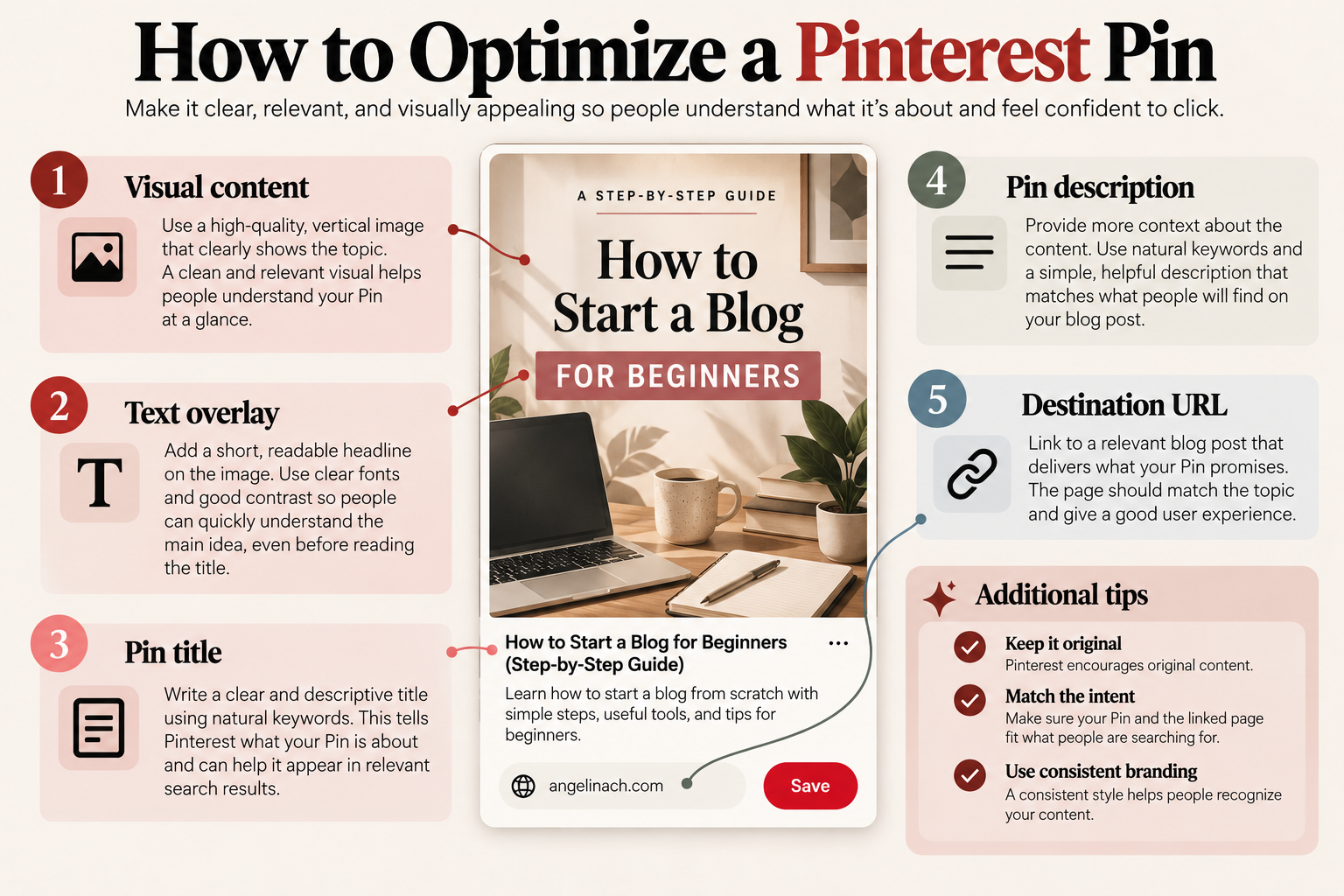
A Pin has to do two jobs: help Pinterest understand the content, and make a searcher want to click. Use the keyword principle from earlier throughout; it doesn’t need repeating in every field.
Title
Tell the reader exactly what the Pin is about. Put the main phrase naturally near the beginning when it fits.
Description
Explain what the reader will find after clicking. Use the main phrase and related terms naturally, but don’t turn the description into a keyword list.
Image and design
Make the topic obvious at a glance. Use a clear hierarchy, readable text, and a vertical layout. The graphic should reinforce the subject rather than simply decorate it.
Text overlay
Use a short headline that communicates the main idea quickly. It doesn’t need to repeat the entire Pin title.
Destination URL
The page should deliver what the Pin promises. If the Pin promises a tutorial, the reader shouldn’t land on a generic category page.
The same principle applies when optimizing the article itself. If you’re building the page from a search query, my guide to how to write an SEO blog post covers the process from keyword and intent through publishing.
Fresh content
Pinterest encourages creators to publish original content regularly. That doesn’t mean every Pin needs to lead to a different article. Multiple Pins can point to the same page when they offer genuinely different angles or information.
Create Pins That Match Search Intent
One article can support several Pins when each represents a genuinely different question, problem, or angle. Changing one keyword in an otherwise identical design doesn’t count.
Take an article called “How to Start a Blog.”
- Beginner guide: “How to Start a Blog for Beginners”
- Problem-focused: “Blogging Mistakes Beginners Should Avoid”
- Checklist: “Blog Launch Checklist: What to Do Before You Publish”
Each draws a slightly different searcher and should differ in headline, image, and framing. A good test: would someone who saw two of your Pins think they were the same Pin? If so, you’ve made one Pin twice.
Make sure the article actually contains what each angle promises. If a comparison Pin links to a page with no comparison, no design will fix the mismatch. Either add the section or skip the Pin.
6. How Many Pins Should You Post?
There is no universal number of Pins a blogger needs to publish each day. Pinterest’s own guidance emphasizes creating regularly and consistently, while third-party recommendations vary widely. Rather than chasing a fixed quota, choose a publishing pace you can maintain and focus on creating useful, original Pins.
7. How to Turn Pinterest Traffic Into Blog Visits
For a blogger, Pinterest only becomes useful when people move from discovering a Pin to actually visiting the website. The Pin must earn the click, and the page must confirm the reader landed in the right place.
Pinterest works particularly well with useful, evergreen content such as guides, tutorials, and lists because those topics can remain relevant after they’re published. Once a visitor arrives, internal links give them a next step, which matters more than the Pin itself for keeping them on the site.
Pinterest traffic isn’t guaranteed, and growth for a new account is typically gradual. For wider traffic tactics beyond Pinterest, see How to Get Traffic to a New Blog in 2026.
What Should Bloggers Measure?
Pinterest’s analytics show many numbers. For a blogger, a few matter most:
- Impressions: how often your Pins appeared. This is reach, not success.
- Saves: a sign people found the Pin worth keeping.
- Outbound clicks: people leaving Pinterest for your site. For a blogger whose goal is website traffic, outbound clicks are usually more useful than impressions alone.
- Outbound click rate: clicks relative to impressions, showing how persuasive a Pin is once seen.
- Website behavior: in your own analytics, what visitors do after arriving, such as pages viewed and whether they continue to another article.
High impressions with few outbound clicks can indicate a problem with the Pin’s promise, design, description, or search intent. Strong clicks followed by quick exits can point to a mismatch between the Pin and its destination page.
Common Pinterest SEO Mistakes
- Keyword stuffing: hurts readability without improving relevance.
- Irrelevant boards: Pins saved to unrelated boards weaken the topic signal.
- Misleading titles: clicks that bounce erode trust.
- Irrelevant destination pages: always link to the page that answers the Pin’s promise.
- Generic graphics: unclear, stock-only Pins are easy to scroll past.
- Chasing impressions: reach without clicks isn’t blog traffic.
- Copying competitors blindly: study them for intent, then fit your own content.
- Publishing repetitive, low-value Pins: Creating lots of near-identical designs doesn’t make the content more useful. If you’re making multiple Pins for one article, give each one a meaningful reason to exist.
Frequently Asked Questions
Do Pinterest keywords matter for SEO?
Yes. Pinterest uses the language around Pins and boards to understand what content is about and match it with relevant searches. The key is using keywords naturally rather than stuffing them into every field.
How many Pins should I post?
No official daily number exists. Pinterest’s guidance emphasizes regular, original content; third-party recommendations range from a few per week to several per day. Choose a sustainable pace.
Should every blog post have multiple Pins?
Not necessarily. Important evergreen posts benefit from multiple Pins with genuinely different angles. Minor posts may only need one.
Is Pinterest SEO the same as Google SEO?
No. Both rely on relevance and intent, but Pinterest is more visual, more interest-driven, and more dependent on Pin-level engagement.