

If you’re wondering how to get traffic to a new blog, the process starts with understanding what your audience is searching for and making your content easy to discover.
The solution isn’t simply to publish more content. You need to understand what your audience is searching for, create articles that address those needs, make sure search engines can discover your pages, and give readers relevant ways to find your content.
This guide covers practical ways to get traffic to a new blog, from choosing topics and building related content to using Pinterest, improving existing articles, and measuring performance with Google Search Console. It also explains how to evaluate your efforts so you can make informed decisions about what to improve next.
1. Getting Traffic to a New Blog Starts With the Right Topics
One common mistake when starting a blog is writing about whatever seems interesting and hoping readers eventually find it. A better starting point is to identify topics that fit your audience and have evidence of search demand.
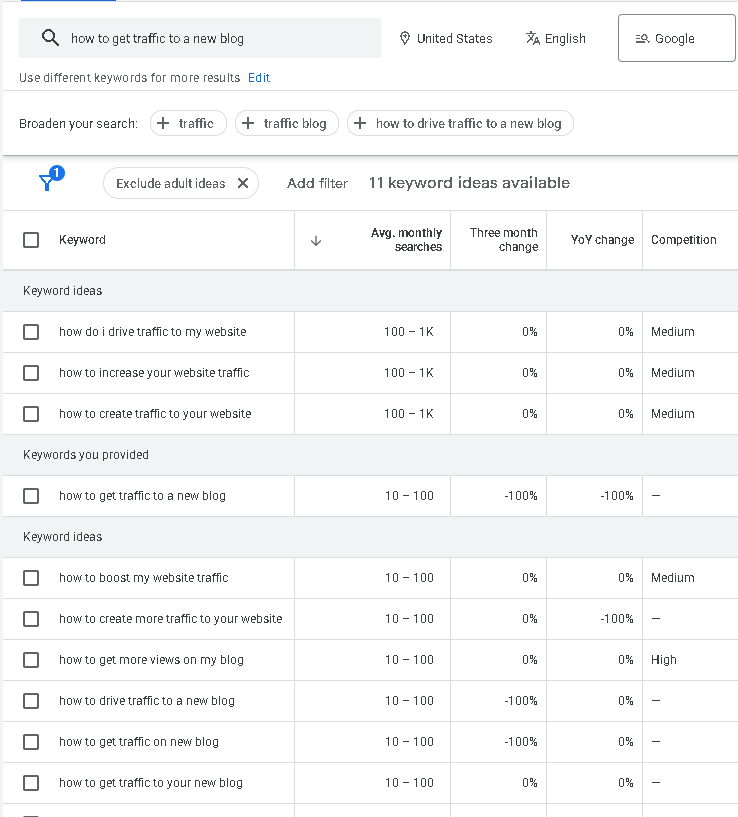
Google Keyword Planner can help you discover keyword ideas and examine estimates of search volume. These estimates can help you compare potential topics, although they don’t guarantee that a keyword will bring traffic or be easy to rank for.
After identifying a promising keyword, examine its search engine results pages (SERPs). Look at the pages already ranking, the types of content they provide, the questions they answer, and whether your article could offer something useful that existing results don’t adequately cover.
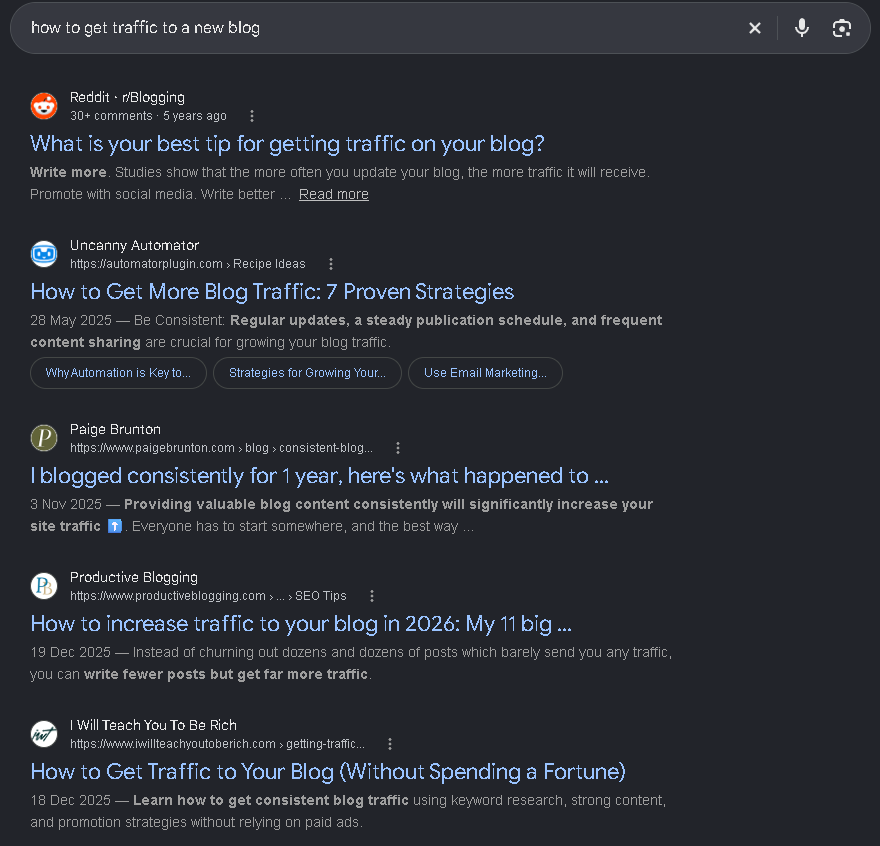
When reviewing the SERPs, use an incognito or private browsing window to reduce the influence of your browsing history and personalized search activity. Also, check that your search language and region match the audience you want to reach.
For a blog about blogging and online content, this research might lead to topics around starting a blog, attracting visitors, using AI tools, or monetizing content. These topics can also connect to one another, helping you plan related articles rather than publishing isolated posts.
The goal isn’t to find a keyword with impressive numbers alone. It’s to choose a topic that fits your site, matches the searcher’s intent, and gives you a realistic opportunity to create a useful article.
2. Build Related Content Around a Topic
One article gives readers one place to find an answer. Related articles give them more ways to explore a topic and find answers to the questions that come next.
Instead of publishing unrelated posts, organize your content around a few core topics. For a blog about blogging and online content, for example, you might cover starting a blog, using AI for blogging, SEO, getting traffic, and monetization.
These topics can connect naturally. Someone reading about starting a blog with AI might next want to learn how to attract visitors. Once they understand how to get traffic, they may want to explore ways to monetize their content.
This approach helps you plan articles that support one another rather than treating every post as a separate project. It also gives readers relevant next steps when they finish an article.
You can start by choosing a core topic and identifying related questions your audience might ask. Keyword research and SERP analysis can help you discover those questions and decide which ones deserve their own articles.
For example, a guide to starting a blog with AI could connect to articles about AI tools for bloggers, blog traffic strategies, SEO, and monetization.
Related content doesn’t guarantee higher rankings or traffic. Each article still needs to satisfy its search intent and provide genuine value. The goal is to build a useful collection of content that serves your audience more completely than a series of disconnected posts.
3. Create Content Worth Clicking
Getting a page in front of someone is only half the job.
The page also has to be worth their time.
A useful article answers the reader’s actual question without unnecessary filler. It should have a clear structure, practical examples where appropriate, and information that helps readers understand or solve their problem.
If you use AI to help write content, remember that a reasonable first draft isn’t necessarily a useful finished article. Review the information, improve the explanations, and add relevant examples or analysis rather than publishing generic output.
AI can help you create a draft quickly, but the finished article still needs to offer readers a reason to choose it over other results.
4. Make Sure Google Can Find Your Content
Before Google can rank an article, it needs to discover and index the page. A few basics can help:
- Sitemap: Helps Google discover the pages on your site.
- Site structure: Make sure pages are accessible through your navigation and links.
- Internal links: Connect related articles so readers and search engines can find other pages.
- Basic on-page SEO: Use clear titles and headings that describe the content.
- Google Search Console: Check whether Google has indexed your pages.
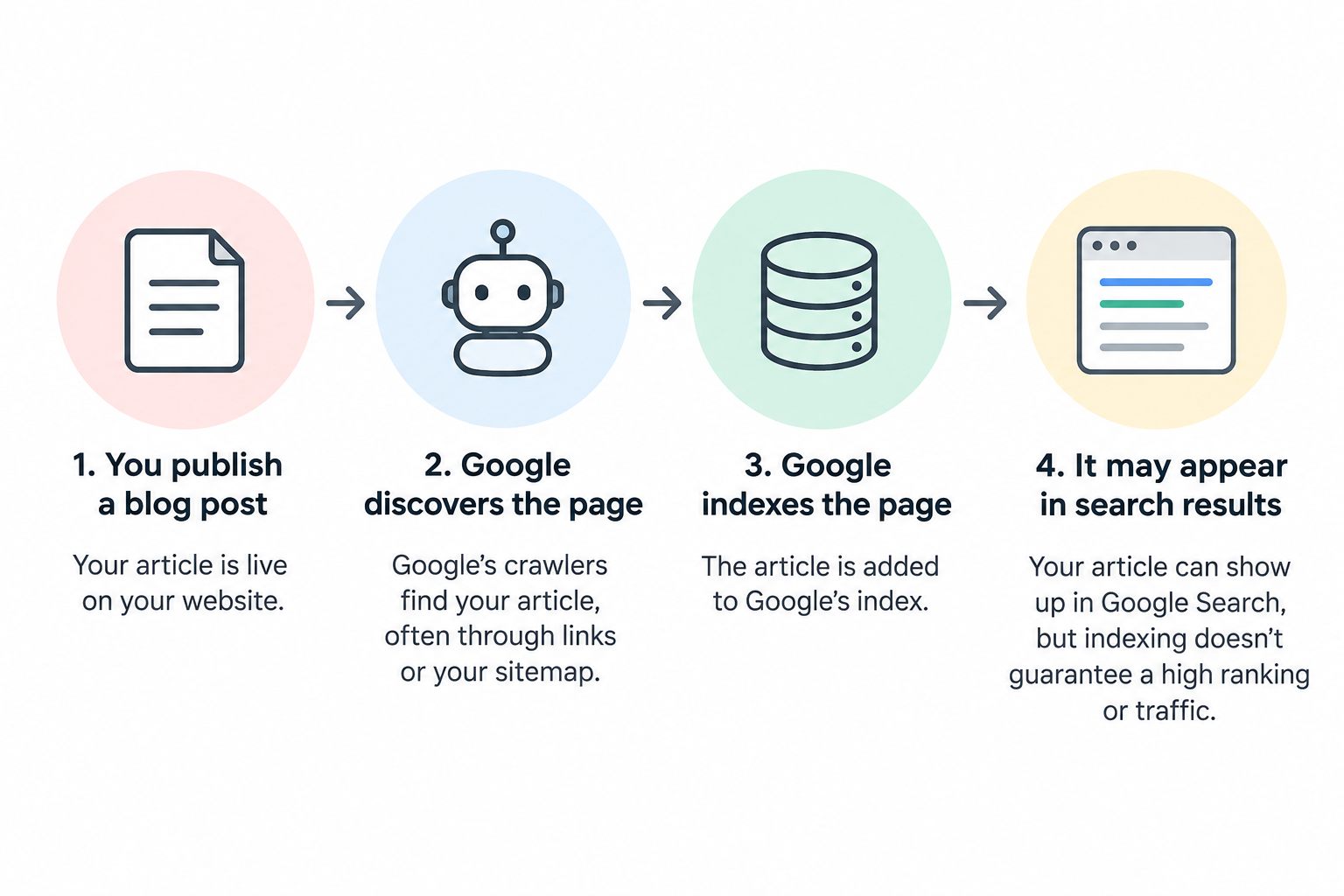
One distinction is worth remembering: being indexed doesn’t mean ranking. A page can be in Google’s index and still receive very few impressions. Indexing is the starting point, not a guarantee of traffic.
5. Connect Your Articles With Internal Links
Internal links give readers somewhere useful to go next. They also help search engines discover other pages on your website and understand how those pages relate to one another.
For example, an article about how to make money blogging can link to this guide on getting traffic to a new blog. Someone exploring blog monetization may also need to understand how to attract readers before they can build an audience and earn from their content.
The key is relevance. Link to another article when it adds useful context or helps readers take the next step. Use descriptive anchor text so readers know what to expect when they click, rather than relying on vague phrases like “click here.”
Internal links won’t guarantee higher rankings or more traffic, but they make your content easier to navigate and help readers discover related information instead of reaching a dead end.
6. Promote Your Blog Through Multiple Channels
Google Search isn’t the only way to attract visitors to a new blog. You can also distribute your content through Pinterest, email, social media, professional networks, and relevant online communities.
The best channels depend on your audience and the type of content you publish.
- Pinterest: Create Pins with different headlines or angles that link to your articles. This gives each article more opportunities to be discovered.
- Email marketing: Build an email list by offering readers a reason to subscribe, then send relevant updates when you publish new content.
- Reddit and online communities: Participate in discussions related to your niche. Share an article when it genuinely answers a question, and follow each community’s rules about self-promotion.
- Social media: Turn key points from your articles into useful posts, short tips, or discussions that introduce people to the topic.
- LinkedIn: Share professional insights, practical lessons, and article summaries when they fit the interests of your audience.
- Direct outreach: When appropriate, share relevant resources with people who may genuinely find them useful.
You don’t need to use every channel. Start with a few that fit your audience and the time you have available. For example, a blog about blogging and online monetization could prioritize Google Search, Pinterest, email, and LinkedIn, while another niche might benefit more from different platforms.
Remember that publishing a link is only the beginning. Give people a clear reason to click, make sure the article delivers on its promise, and pay attention to which channels actually bring relevant visitors.
The goal isn’t to be everywhere. It’s to make your content discoverable in the places where the right readers are likely to find it.
7. How to Get Traffic to a New Blog: Measure and Improve
Publishing articles and promoting them are only part of growing a blog. You also need to understand what’s working so you can decide what to improve next.
Google Search Console is a free tool that helps you measure how your website performs in Google Search. Its Performance report provides several useful metrics:
- Impressions: How often your pages appeared in Google Search results.
- Clicks: How often people clicked through to your website from those results.
- Click-through rate (CTR): The percentage of impressions that resulted in clicks.
- Average position: The average position of your search results.
- Queries: The search terms that caused your pages to appear.
- Pages: Which pages received impressions and clicks.
These metrics can help you identify opportunities. When a page receives impressions but few clicks, consider whether its title and search snippet clearly communicate its value. Relevant queries that the article doesn’t fully address may reveal opportunities to improve the content. Meanwhile, declining traffic could indicate outdated information, unclear explanations, or missing internal links.
You don’t always need to write another article. Sometimes, updating an existing post, answering a missing question, or improving its title is a more useful next step.
Make targeted changes based on what you find, allow time for performance data to accumulate, and review the results again. For a new blog, the goal is to learn from the available data rather than expect immediate traffic.
FAQ
How do I get my first visitors to a new blog?
Start by publishing useful articles that answer specific questions, making sure Google can discover your pages, and sharing your content through relevant channels such as Pinterest, LinkedIn, email, or online communities. Focus on reaching people who are likely to find your content useful rather than simply increasing visitor numbers.
How long does it take to get traffic to a new blog?
There’s no guaranteed timeline. Search visibility depends on factors such as your topic, competition, content quality, and how well your pages meet searchers’ needs. Monitor your progress over time rather than expecting a specific number of days or months.
How many blog posts do I need before getting traffic?
There’s no magic number. A single useful article can attract visitors, while dozens of unfocused posts may receive little attention. Start with topics relevant to your audience and build related content that gives readers more useful information to explore.
Is Pinterest useful for a new blog?
Pinterest can provide another way for people to discover your articles through Pins, search, and recommendations. You can create multiple Pins for one article, each highlighting a different angle. However, results vary, so measure referral traffic and clicks rather than assuming that publishing more Pins will automatically bring visitors.
Should I use social media to promote my blog?
You can, but you don’t need to be active on every platform. Choose channels that fit your audience and content. Share useful insights, participate in relevant conversations, and link to your articles when they provide additional value.
Is paid advertising necessary to get traffic to a new blog?
No. You can start with organic search, Pinterest, email, social media, and relevant communities without paying for advertising. Paid promotion is an option later, but it makes sense to establish clear goals and understand what you want to achieve before spending money.
The Bottom Line
Getting traffic to a new blog isn’t about finding one magic tactic. It takes useful content, clear ways for people to discover it, and a willingness to improve based on what the data shows.
Start by choosing topics people are searching for, creating articles that answer their questions, and making sure Google can discover your pages. Then distribute your content through relevant channels such as Pinterest, email, social media, and online communities.
As your blog collects data, use Google Search Console to understand your search visibility and Google Analytics to see how visitors reach and interact with your website. Use those insights to decide what to improve instead of publishing more content without a clear direction.
You don’t need to do everything at once. Choose a few practical steps, give them time, and keep refining your approach as you learn what works for your audience.