
Most “best AI tools for bloggers” lists online read like an inventory of every AI product on the market. For example, they list ten, fifteen, sometimes even more tools and put a checkmark next to each one.
I get why it’s tempting to inflate the list, but when I started building my site, AngelinaCH, I quickly realized something: I didn’t need fifteen subscriptions to draft and publish a post. I needed a lean set of tools I actually understood—tools that solved a specific problem I was running into.
So, this isn’t another generic “best AI tools for bloggers” roundup. This is the exact setup I rely on right now to run AngelinaCH, including what each tool does, what it costs me, and where it fits into my routine.
My Blogging Stack at a Glance
| Tool | Main Use | Plan | Monthly Cost |
| ChatGPT | Brainstorming, outlining, SEO strategy, social repurposing | Pro | ~$20 |
| Claude | Long-form drafting and heavy editing | Free | $0 |
| Perplexity | Fast research and discovering primary sources | Free | $0 |
| Yoast SEO | Pre-publish on-page SEO checklist | Free | $0 |
| Grammarly | Proofreading and catching obvious typos | Free | $0 |
| Canva | Blog headers, infographics, and Pinterest pins | Pro | ~$18 |
| Google Search Console | Real performance data and search queries | Free | $0 |
Note: Yoast and Search Console aren’t AI tools. I include them because pretending my workflow is “AI-only” wouldn’t be accurate.
1. ChatGPT: The Everyday Co-Pilot
ChatGPT is the first tab I open. I also use it for many of the broader content-creation tasks I cover in my guide to AI tools for content creation. Once a post is published, I use it again to turn the core insights into LinkedIn posts and Pinterest descriptions.
It acts as my editorial sounding board. It helps me evaluate whether a draft genuinely answers search intent, figure out internal linking opportunities, and decide if an idea is even worth pursuing in the first place.
I don’t use it because it’s the best at every individual task. I use it because having one versatile tool handle many small jobs keeps my workflow simple.
2. Claude: Long-Form Writing & Structural Edits
When it comes to drafting actual paragraphs and editing longer articles, I often switch to Claude. I find it useful for working through longer pieces section by section without losing the overall structure. If you’re specifically comparing writing assistants, I’ve also put together a guide to AI writing tools.
I stick to the free plan. It can be restrictive during peak hours, but so far, I haven’t found a compelling reason to stack another paid monthly subscription onto my operational costs. If that changes, I’ll update this article.
3. Perplexity: Research & Source Discovery
When tackling a topic I need to understand quickly, Perplexity is my starting point. It’s particularly useful for getting a rapid overview, finding relevant sources, and surfacing data points worth investigating.
I never take Perplexity’s output at face value. Hallucinations happen. If a stat or study is important enough to include in an article on AngelinaCH, I always click through and verify the original source myself.
4. Yoast SEO: The Pre-Publish Safety Net
Yoast is a standard WordPress plugin, but it plays a very specific role in my workflow: it’s the checklist I run through before hitting publish. I use its feedback to check focus keyphrases, meta descriptions, image alt tags, and internal links.
However, a green light in Yoast won’t magically rank an article. It simply confirms that basic on-page fundamentals are covered before Google crawls the page.
5. Grammarly: The Final Polish
Grammarly is my final line of defense against typos, bad grammar, and awkward phrasing.
I ignore a lot of its stylistic suggestions. Automated grammar checkers can strip away personality in favor of standardized corporate language. That’s why I reject any edit that flattens my natural voice or alters my intended rhythm.
6. Canva Pro: Visuals & Pinterest Distribution
Canva handles the visual identity of AngelinaCH—featured images, quick diagrams, simple infographics, and Pinterest graphics. While it has added plenty of AI magic tools recently, I use it primarily because it’s the fastest way to build clean assets without opening complex design software.
It’s also an important part of my Pinterest strategy, since it lets me quickly create multiple Pin variations for each article.
7. Google Search Console: What’s Actually Happening
Search Console isn’t an AI tool, but it’s essential to my workflow. If Yoast is my pre-publish sanity check, Search Console shows me what happens after Google indexes the content.
It tracks impressions, actual clicks, click-through rates, and exact search queries bringing readers to AngelinaCH. I go into more detail about how I use these metrics in my guide to getting traffic to a new blog. It doesn’t send traffic on its own, but it provides the raw data needed to decide which posts to update, rewrite, or expand.
What This Actually Costs Every Month
Right now, running this stack costs me roughly $38 a month (ChatGPT Pro at ~$20 and Canva Pro at ~$18).
That cost isn’t massive, but while AngelinaCH is still growing and building momentum, keeping overhead low is a deliberate choice. Out of seven core tools in my current blogging stack, five cost me absolutely nothing. You don’t need to spend hundreds of dollars a month on specialized software just to start and run a blog.
How an Article Moves Through My Process
Here is how a draft actually moves from an idea to a live post on AngelinaCH:
1. Research: Perplexity for initial discovery, followed by manual verification of sources.
2. Planning: ChatGPT for outlining and refining search intent.
3. Drafting: Claude for long-form writing; ChatGPT for tricky rewrites.
4. Editing: Grammarly for catching typos and cleanups.
5. SEO Check: Yoast for on-page basics.
6. Visuals: Canva for post headers and Pinterest graphics.
7. Publishing: Direct to WordPress.
8. Tracking: Google Search Console to monitor performance over time.
9. Repurposing: ChatGPT to adapt the post for social channels.
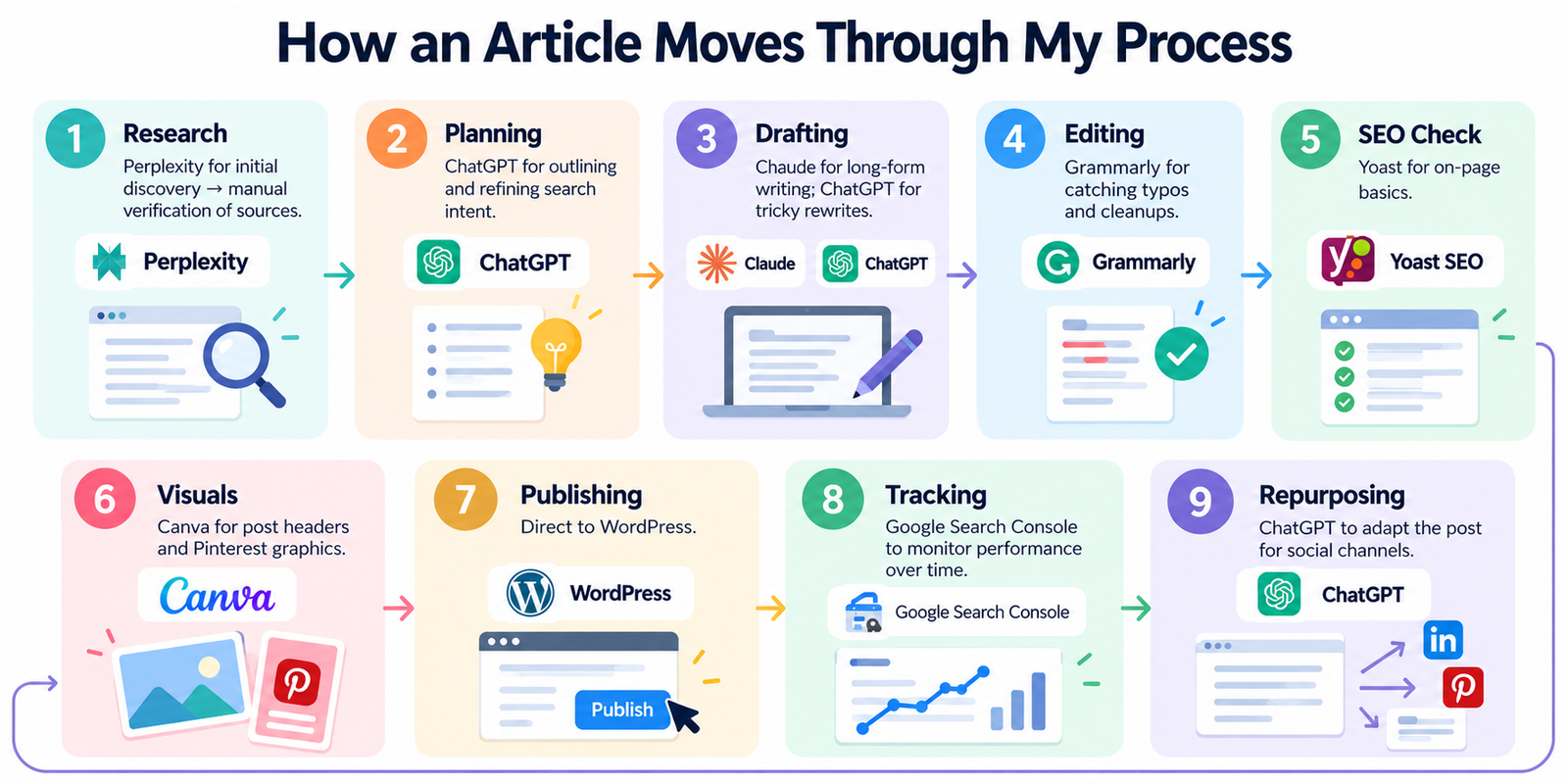
Notice the overlap? ChatGPT touches almost every phase. That’s one reason I haven’t needed a separate tool for every small task in my workflow.
Do You Really Need All of This to Start?
No. Not even close.
If you’re starting a blog today, you can start with a free general-purpose AI assistant and a free grammar checker. Upgrade when you run into a limitation that’s actually worth paying to solve.
My stack wasn’t planned out in advance. I added tools one by one only when a specific, annoying problem slowed me down. Start with a clear problem you need to solve, not a list of software to buy.
Frequently Asked Questions
What are the best AI tools for bloggers?
For my workflow, ChatGPT is the tool I use most because it covers the widest range of tasks. That doesn’t necessarily make it the best choice for every blogger, though. Someone who mainly needs research, editing, or design may get more value from a more specialized tool.
What AI tools do you actually need to start a blog?
For many beginners, one general-purpose AI assistant for writing and idea generation, plus a free grammar checker, is enough to get moving.
Can I blog using free AI tools?
Yes — a good chunk of a blogging workflow can run on free plans. In my own stack, five out of seven tools are currently free.
How much does it cost to use AI for blogging?
It depends entirely on which tools and plans you choose. My own stack currently runs on two paid subscriptions and five free tools, but a beginner could start spending $0.
Is Yoast an AI tool?
No — Yoast is primarily an SEO plugin for on-page checks like keyphrase placement and meta descriptions, not an AI writing assistant.
Final Takeaway
If you’re looking for the best AI tools for bloggers, start with the problems you actually need to solve. My AngelinaCH stack is relatively small because I added tools when a specific part of my workflow needed help, not because I wanted to collect every new AI product. Right now, that means a mix of paid and free tools, with each one doing a specific job. Your stack may look different. The useful part is figuring out what actually saves you time and what doesn’t.