

If you’re learning how to create a blog content calendar, the goal isn’t to build a complicated system. A useful calendar should help you decide what to publish, when to publish it, and what’s already in progress.
Most blogs don’t stall because the owner ran out of ideas. They stall because the ideas live in five places: a notes app, a half-finished spreadsheet, a few browser tabs, and somewhere in your head. Nothing is scheduled, nothing has a status, and every publishing day starts with the question “what should I write today?”
1. What Is a Blog Content Calendar?
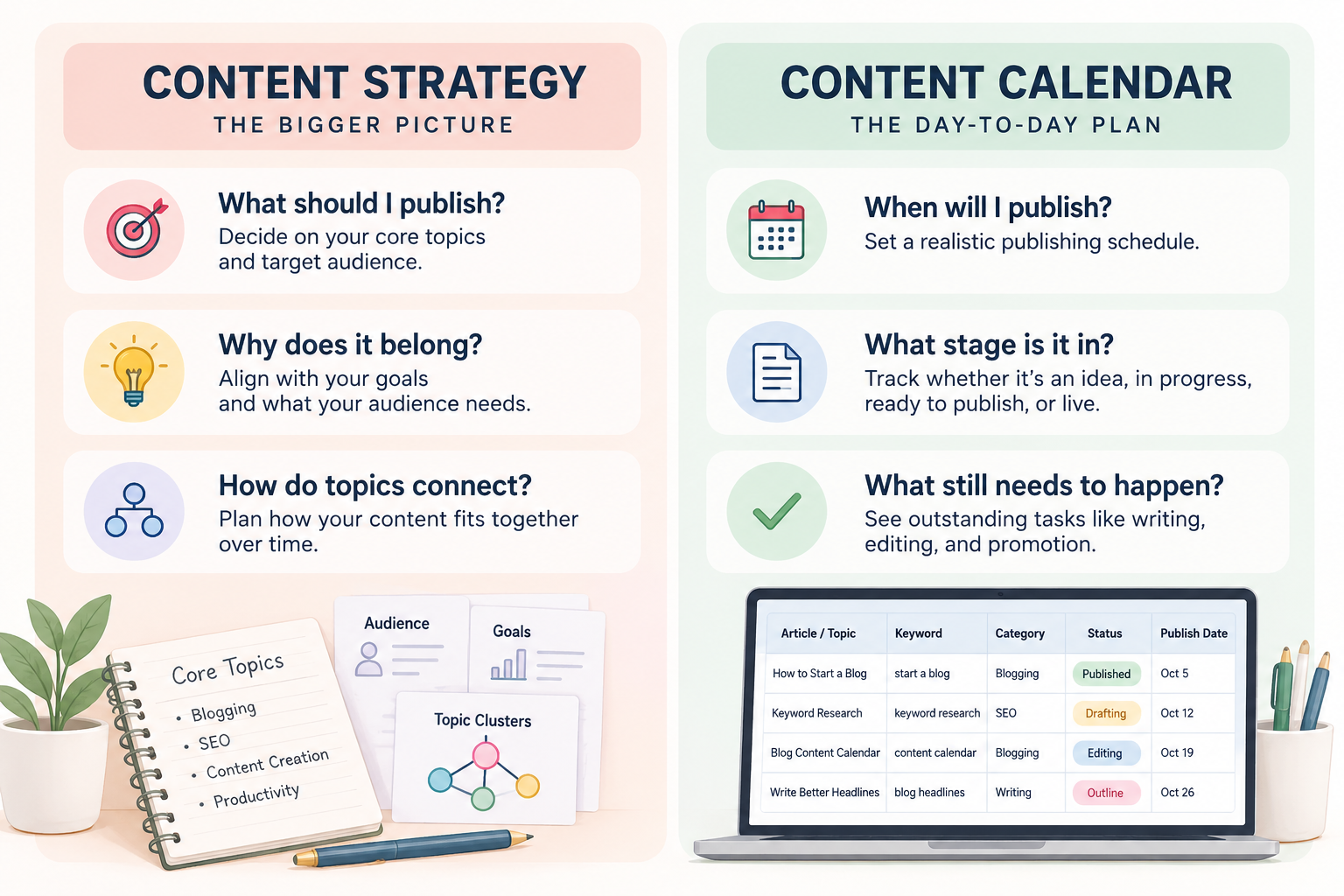
A blog content calendar is a working plan that shows what you intend to publish, when, and how far along each piece is. At any moment it should answer three questions: what’s planned, what’s in progress, and what’s already live.
It helps to separate it from three things it’s often confused with.
A list of ideas is a pile of possibilities. A calendar contains only the ideas you’ve decided to act on, with a position in time.
Content strategy decides what your site should cover and why. If you haven’t settled that yet, start with a content strategy for a new blog. and come back. Strategy answers: what should I publish and how do my topics connect? The calendar answers when will I publish it, what stage is it in, and what still needs to happen? One feeds the other, but they’re different documents.
Editorial planning is broader and can include workflows, standards, and approval processes. A solo blogger usually doesn’t need all of that; a content calendar is the practical day-to-day part.
Don’t make it more complicated than it is. For many new blogs, a calendar is one spreadsheet with a handful of columns.
2. Why Use a Content Calendar?
A calendar won’t make your articles rank, and it won’t guarantee traffic. What it does is make your publishing more deliberate. A calendar won’t solve every publishing problem, but it can make a few things easier.
- See what’s coming. Knowing the next few articles removes the daily decision about what to write.
- Keep your topics balanced. A calendar makes it easier to spot overused categories, gaps, and overlapping ideas.
- Track what needs to happen. A status column helps you see what’s planned, in progress, ready to publish, or already live.
- Build a realistic publishing rhythm. Comparing planned and actual dates shows how much time your articles really take.
That last one matters most for solo bloggers, because the person doing the planning is also the person doing the writing, editing, and publishing.
3. Decide What Belongs on the Calendar
A calendar fills up with whatever you put into it. If every idea goes in, it becomes a to-do list nobody wants to open.
Before adding an article, run it through a few questions:
- Does it fit one of the site’s core topics?
- Does it answer a specific question someone would actually search for?
- Is the search intent clear? Is the reader trying to learn something, compare options, or follow a process?
- Is it meaningfully different from something you’ve already published or planned?
- Does it belong now, or should it wait until a foundation article exists?
The last question is the one people skip. An article can be good and still not be ready for the calendar. If it only makes sense after you’ve published a basic explainer, put it in your idea list for now and move it onto the calendar once the groundwork is done.
Your keyword research should help validate these decisions. If you haven’t done that yet, keyword research for a new blog can help. Ideas that don’t pass these questions stay in your idea list rather than bloating the calendar.
4. Choose the Fields You Actually Need
A beginner does not need twenty columns. Every extra field is something you have to fill in and keep accurate, and the fields you skip filling in are the ones that make a calendar feel like a chore.
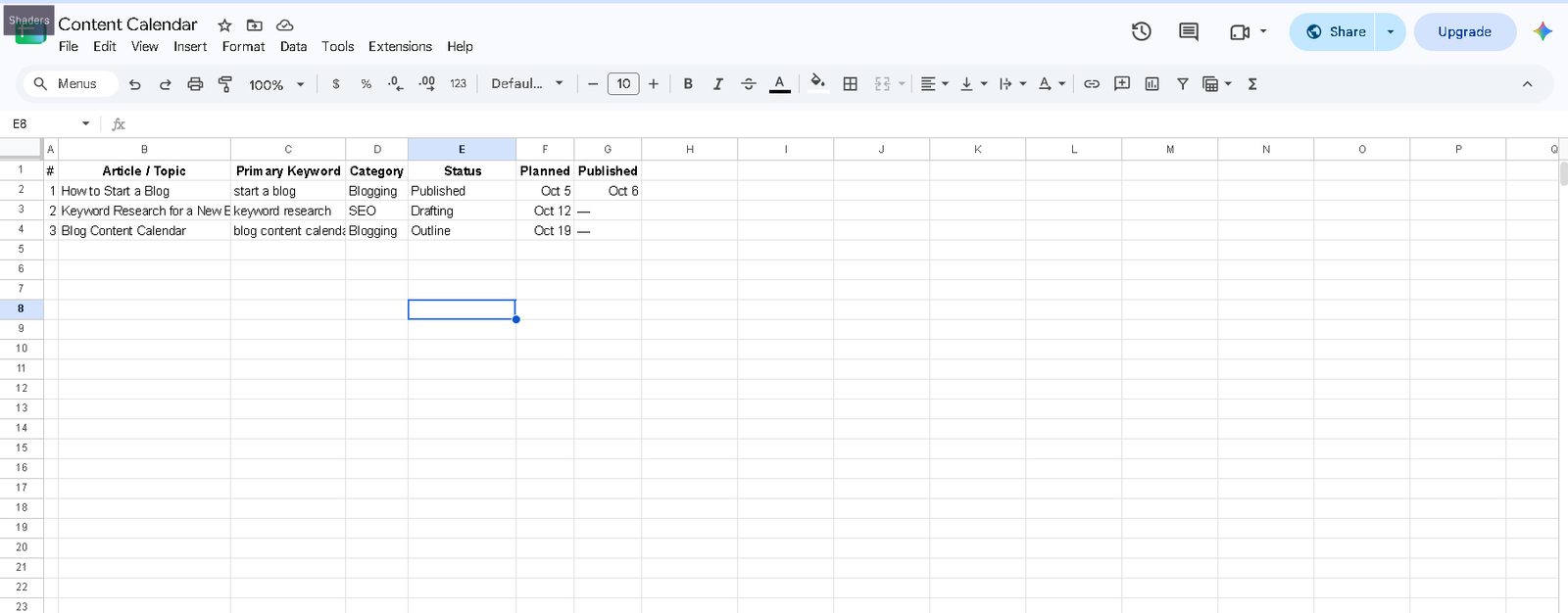
Start with six:
| Field | Purpose |
| Article / topic | What you’re publishing |
| Primary keyword | The main search target |
| Category / topic | Where it fits on your site |
| Status | Idea, outlining, drafting, editing, published |
| Planned publish date | When you intend to publish |
| Actual publish date | When it really went live |
The two date columns are worth keeping separate. Comparing planned and actual dates over time tells you how long articles really take, which is more useful than any publishing benchmark you’ll read elsewhere.
Add other fields only when you hit a real need for them. Common additions include:
- Internal links, to note which posts should link to or from this one
- Update date, once you have older posts that need refreshing
- Affiliate or commercial intent, if you monetize through product recommendations
- Pinterest status, if that’s one of your distribution channels
There’s no perfect spreadsheet. If a column hasn’t helped you make a decision in a month, delete it.
5. How to Create a Blog Content Calendar, Step by Step
Learning how to create a blog content calendar doesn’t need to take a weekend. The first setup can usually be done in an hour or two.
- Start with your content strategy. Pull out your core topics and the articles you’ve already identified under each one. If you don’t have these, build that first. The calendar can’t supply the strategy.
- List the articles you actually want to publish. Not every idea, just the ones that passed the questions above. Aim for a few weeks to a few months of content, not a full year.
- Group them by topic. This shows you where your coverage is thick and where it’s thin, and it makes it easier to publish related posts close together so they can link to each other.
- Decide what comes first. Foundational and broad articles usually go before narrow ones that depend on them. If one article answers a question that three others assume, publish it early.
- Give each article a realistic target date. Base this on how long a post really takes you, including research, writing, editing, and formatting. If you’ve never tracked it, publish a couple of posts and see.
- Add a status to each row. Idea, outlining, drafting, editing, published. Update it whenever the stage changes. This is the habit that makes the calendar useful.
- Leave space. Don’t schedule every available day. A calendar with no slack fails the first time something takes longer than expected.
6. How Often Should You Publish?
When you create a blog content calendar, your publishing frequency should reflect the amount of work each article actually requires.
Pick a schedule based on the things that actually constrain you:
- Available time. How many hours a week can you truly give this?
- Article depth. A 600-word answer and a 2,500-word comparison are very different amounts of work.
- Other responsibilities. A job, clients, or family obligations aren’t going away.
- Promotion and distribution. If each article also needs social posts, a newsletter mention, or pin graphics, count that time too.
A reliable way to choose is to start slightly slower than you think you can manage. You can always speed up after a few weeks of meeting your dates. Missing deadlines in the first month teaches you to ignore the calendar.
A realistic schedule beats an ambitious one you can’t keep. If you publish one solid post every ten days and never miss, that’s a better foundation than three posts in a week followed by a month of nothing.
7. Which Tool Should You Use?
Pick the one you’ll open without being reminded. Most options work for a single-person blog:
| Tool | Best for |
| Google Sheets / Excel | Simple, flexible content calendars |
| Notion | Calendar + notes + database |
| Trello | Visual content workflow |
| WordPress | Basic scheduling and post status |
The tool matters less than whether you’ll actually maintain the calendar. For most new blogs, Google Sheets is enough. Move to another system only when your current setup creates real friction.
8. Review and Adjust Your Content Calendar
A calendar is a plan, not a contract. Treating it as fixed is how people end up publishing an article they no longer believe in just because it was scheduled.
Reasons to change the plan are legitimate:
- An article takes longer than expected and moves back a week.
- New search data or Search Console results suggest a different topic would serve readers better.
- Something unexpectedly useful comes up, such as a question readers keep asking, and deserves a slot.
- You realize two planned posts overlap and should be merged into one stronger article.
- It makes more sense to update an older post than to publish a new one on the same subject.
You shouldn’t need to rearrange the calendar every week. If the plan keeps changing, revisit how you’re choosing articles before adding more to it. The calendar exists to reduce decision fatigue. You make the hard decisions once, in advance, then spend most of your time executing. Editorial judgment still applies when something changes, but it should be the exception.
A short review every month or so keeps the calendar honest. You don’t need a formal process. Open it and look for:
- Topics or categories you’ve neglected. Categories you meant to cover and haven’t touched.
- Similar or overlapping articles. Several posts targeting nearly the same question.
- Older posts that need updating. Posts with outdated information or screenshots.
- New opportunities or seasonal topics. Topics that should be published ahead of a busy period.
Ten minutes is usually enough. The review is also a good time to compare your planned and actual dates and adjust the schedule accordingly.
Common Mistakes When Planning Blog Content
Making the calendar too complicated. More columns and color codes don’t improve the posts. If maintaining the calendar feels like work, simplify it.
Adding every idea instead of prioritizing. A calendar with sixty undifferentiated items can’t tell you what to do next.
Treating the publishing date as more important than quality. A date is a target. Moving a weak draft back a few days is better than publishing it on time.
Building an unrealistic schedule. Overcommitting in the first month usually leads to abandoning the calendar by the third.
Treating the calendar as the strategy. A calendar organizes decisions you’ve already made. If the topics themselves aren’t thought through, scheduling them won’t help.
FAQ
What should you include when creating a blog content calendar?
When you learn how to create a blog content calendar, start with the article topic, primary keyword, category, status, planned publish date, and actual publish date.
How often should I publish blog posts?
There’s no single correct frequency. Choose a pace that fits your available time, how long your articles take, and how much promotion each one needs. A schedule you can keep for months is better than a faster one you can’t.
What is the best tool for a blog content calendar?
The one you’ll actually use. Google Sheets works well for most solo bloggers. Notion and Trello are reasonable alternatives if you already use them. Switch only if your current setup is causing real friction.
Do I need a content calendar for a new blog?
You can publish without one, but a basic calendar helps once you have more than a few posts planned. It keeps topics organized, shows what’s in progress, and makes it harder to lose track of drafts. If you only have a couple of ideas right now, a simple list is enough until you have more to coordinate.
What is the difference between a content calendar and a content strategy?
A content strategy decides what to publish and why, including which topics belong on the site and how they connect. A content calendar schedules those decisions: when each piece goes live, what stage it’s in, and what remains to be done.
Start Small and Keep It Usable
Learning how to create a blog content calendar comes down to a few decisions: choose what deserves a place on it, track only the fields that help you, set dates you can meet, and review it now and then. Everything else is optional.
Start with a spreadsheet, add the next handful of articles you intend to publish, and give each one a realistic date. Update the calendar as you work. If maintaining it starts taking more time than it saves, remove the fields or steps you don’t need. If you need traffic ideas to pair with your publishing plan, how to get traffic to a new blog is a sensible next read.