
Learning how to start a faceless YouTube channel is less about finding the perfect AI tool and more about building a channel concept you can actually sustain. No lighting, no makeup, no feeling awkward on camera. With AI tools becoming more accessible, it looks like something anyone could start this weekend. That last part is where things get misleading.
However, being faceless simply means the creator doesn’t appear on camera. It doesn’t mean the channel runs itself, and success doesn’t come automatically once you plug in a few AI tools. Search “how to start a faceless YouTube channel” and most results are written by companies selling voiceover software, stock footage, or AI editing subscriptions, all following the same formula: pick a niche, install tools, generate a script and a voice, add footage, upload.
That’s not really where a channel succeeds or fails. It succeeds or fails based on decisions made before you ever open an AI tool: what the channel is about, who it’s for, and whether you can keep making videos people want to watch. This guide walks through that thinking first, then gets into production and tools.
What Is a Faceless YouTube Channel?
A faceless YouTube channel is exactly what it sounds like: a channel where the creator’s face never appears on screen. That’s essentially the definition — everything else depends on how you choose to make the channel.
Faceless videos take many forms:
- Voiceover paired with footage or stock clips
- Screen recordings, common for tutorials
- Animation, from motion graphics to illustrated scenes
- Documentary-style videos built on research and narration
- Narrated storytelling, from history to true crime
- Educational or explainer videos
What faceless doesn’t mean is just as important. It’s not automated — someone still has to research, write, and make editing choices. It’s not personality-free either; personality shows up in your ideas, opinions, pacing, and visual style. And it’s not guaranteed passive income. It’s a format, not a business model.
1. Choose Your Faceless YouTube Channel Concept and Niche
If you’re wondering how to start a faceless YouTube channel, the first step isn’t choosing your tools. It’s deciding what you want the channel to be.
There’s a difference between a niche and a channel concept. A niche is a subject area, like psychology or personal finance. A channel concept is the specific angle you take within that subject, repeated in a recognizable way.
For example, Psychology Simplified operates in the psychology niche, but its channel concept is more specific. Its videos explain psychological ideas through simple, relatable scenarios and illustrated storytelling rather than presenting them like traditional lectures.
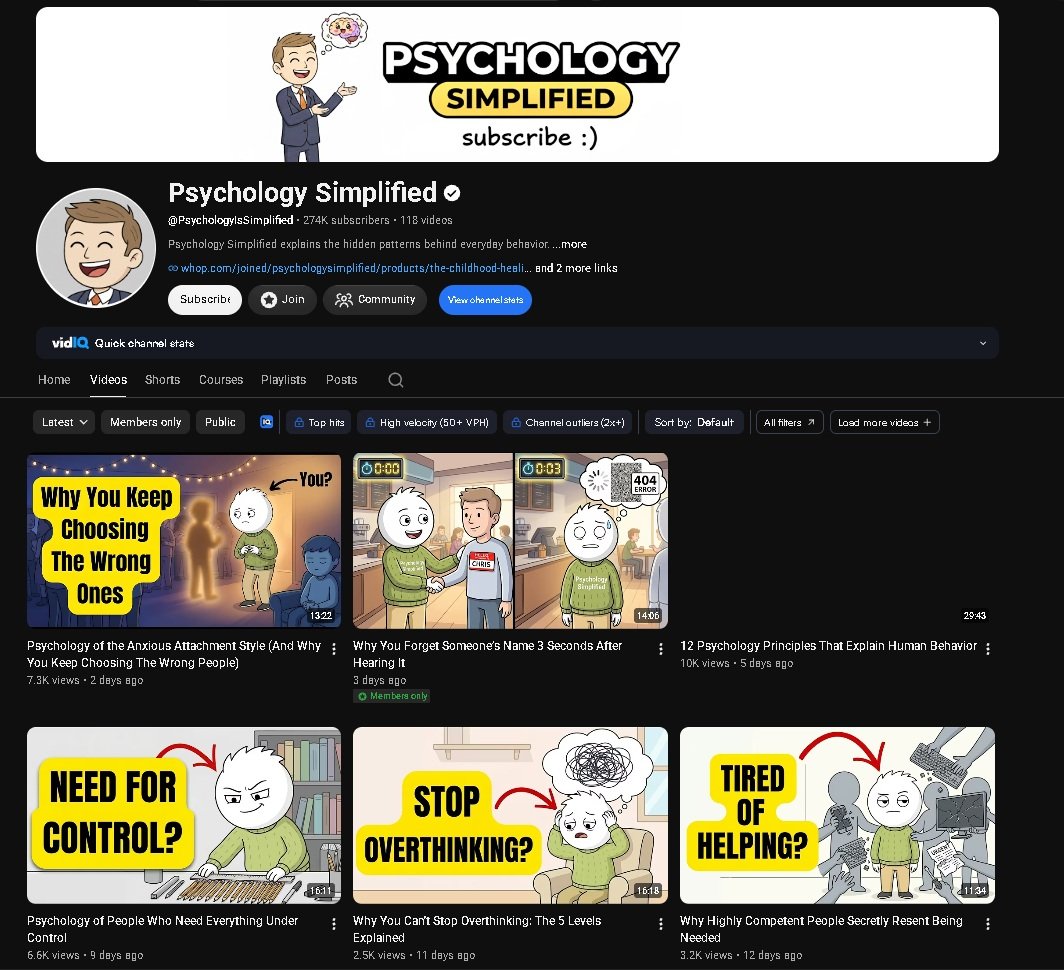
Niche: Psychology
Channel concept: Simplified explanations of human behavior through relatable scenarios and illustrated storytelling.
In other words, the niche is the territory. The concept is what someone actually gets when they subscribe.
Once you have a direction, stress-test it before committing:
- Audience demand. Are people actually searching for and watching content like this?
- Content potential. Is there enough depth for 50 or 100 videos, or will ideas run out after a dozen?
- Sustainability. Can you keep producing without burning out or needing resources you don’t have?
- Competition and personal interest. Is the space too saturated for a new channel to be found, and do you care enough about the topic to keep going?
Choosing a niche purely for its RPM (revenue per thousand views) is a common trap — high-RPM niches like finance or software also tend to be intensely competitive, and without real interest in the subject, that combination usually leads to a channel that stalls after a handful of uploads.
Faceless-friendly categories tend to include history, science explainers, true crime, personal finance, self-improvement, mythology, and space — not an exhaustive list, just a starting point for where interest, demand, and long-term material tend to overlap.
2. Research Channels and Find Your First Video Ideas
This is one of the most practical steps, and it’s easy to rush through.
Start with channel-level research: subscriber count, upload frequency, channel age, overall view patterns. Then go deeper: views, titles, thumbnails, video length, recurring topics, format, comments.
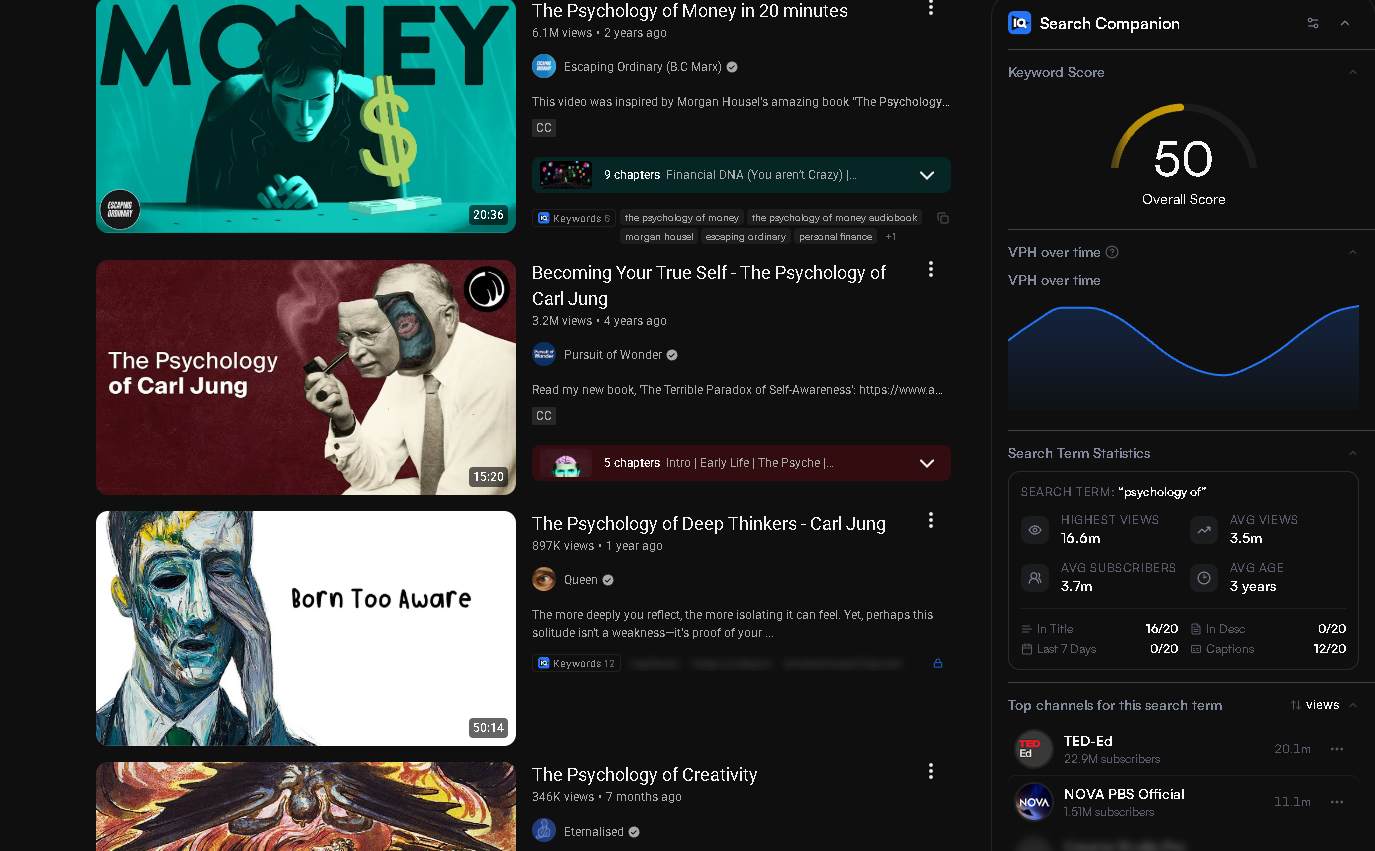
Don’t only study the biggest channels — they often succeeded years ago under different conditions. Instead, a more useful exercise is looking for smaller channels where individual videos significantly outperform the channel’s usual view count. When a channel normally gets a few thousand views but one video gets ten times that, something about that topic, title, or format struck a chord.
The goal isn’t to reverse-engineer someone else’s channel. It’s to look for gaps — underexplored topics, or angles nobody else is taking on a subject with clear demand.
It also helps to have a small pool of ideas ready before launching, rather than figuring out video two while still editing video one.
Good places to look include YouTube’s search suggestions, competitor channels, comments, Google search, Reddit and community discussions, keyword tools, and YouTube’s “related videos.”
Group your ideas into a few content themes rather than treating each as standalone. It makes playlists easier and gives the channel more coherence.
However, keyword search volume alone doesn’t guarantee a video will work. A topic can have decent volume and still be a weak idea if it doesn’t lend itself to an interesting narrative.
3. Choose a Repeatable Video Format
There’s a difference between a topic and a format, and a channel needs both.
Topic: space
Format: a five-minute narrated explanation of one interesting astronomical event, ending with a related question or fact
The topic changes from video to video. The format — how it’s structured, paced, and presented — stays consistent, which makes production faster and gives the channel a recognizable identity.
However, if every video follows the exact same structure and pacing with no variation, the channel can start to feel mass-produced. Aim for structure without turning every video into a copy of the last one.
4. Build Your Faceless YouTube Channel Workflow
A realistic faceless workflow moves through a few stages:
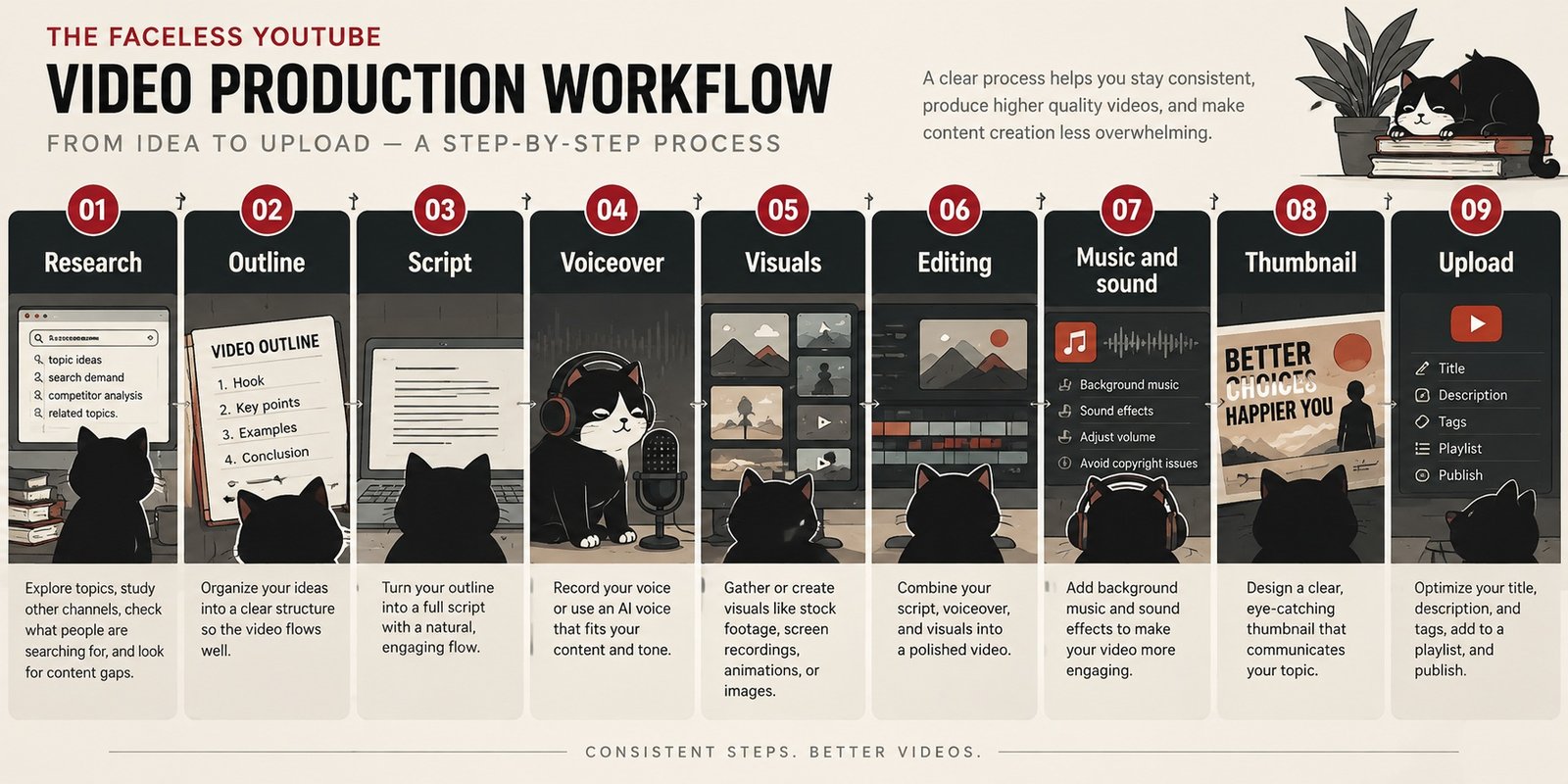
Skipping steps tends to show up later — a script written without research is often thin, and visuals gathered before the script is finished often don’t match the narration’s pacing. It’s not rigid, but having some version of this sequence in mind keeps videos from feeling disjointed.
Where AI Can Help
AI genuinely reduces friction in a faceless workflow, but it’s worth being specific about where it helps and where it doesn’t replace your judgment.
| Task | AI Helps With | Still Needs You |
| Brainstorming | Generating topic angles | Choosing what fits your channel |
| Research | Summarizing sources | Verifying accuracy |
| Outlining | Logical structure | What to emphasize or cut |
| Drafting | First-pass script | Voice, accuracy, originality |
| Editing | Cuts and transitions | Pacing and story choices |
| Voice | Narration without recording | Tone and emotional fit |
| Visuals | Images or B-roll alternatives | Making visuals support the story |
| Thumbnails | Quick visual options | Accuracy, not misleading |
The pattern is consistent: AI is good at first drafts and repetitive work, not at knowing whether something is true, fits your voice, or is the right creative call. Any AI-generated research or claim needs checking before it ends up in a script.
5. Create, Publish, and Learn
With the groundwork in place, pick one idea from your list of ten and run it through the workflow above: research it, outline before scripting, then build visuals around your narration’s pacing rather than the other way around. Edit for clarity first, polish second.
Title and thumbnail work as a pair — together they need to make a clear, honest promise about what the video contains. A good combination is specific, sparks curiosity when appropriate, and stays readable at small sizes, since most viewers are on mobile.
Misleading clickbait might earn a click, but it hurts retention once people realize the video doesn’t deliver. There’s no trick that guarantees clicks; being specific and honest works better than anything else.
None of this needs to be perfect. It needs to be finished, so you have something real to learn from.
The first handful of videos aren’t really about performance. They’re about information.
Once videos are live, watch a few core metrics: impressions, click-through rate, audience retention, average view duration, and traffic sources. Together, these show whether people are seeing your video, choosing to click it, and staying to watch.
Rather than fixating on any single video, look for patterns across several uploads — certain topics or thumbnails getting higher click-through rates, or retention dropping at the same point repeatedly. Patterns across several videos are far more useful than obsessing over one upload.
6. Monetization and AI-Generated Content
How Faceless Channels Make Money
Faceless channels can be monetized through the usual paths: YouTube advertising via the Partner Program, affiliate marketing, sponsorships, digital products, or services related to your niche.
But being faceless itself isn’t a monetization strategy — it’s a format choice. A channel makes money by building an audience that trusts it enough to watch, not because the creator stays off camera.
Monetization requirements, like subscriber and watch-hour thresholds, change over time, so check YouTube’s current official documentation rather than relying on numbers from any single article.
If you plan to monetize your channel, it’s worth reading YouTube’s channel monetization policies before you start publishing.
What About AI-Generated Faceless Content?
There’s a meaningful difference between AI-assisted original content and repetitive, mass-produced content. Using AI for research, drafting, voice generation, or editing doesn’t automatically make a video low quality or against guidelines. What creates problems is generating large volumes of similar content with no real originality or value added.
AI-generated content isn’t automatically prohibited on YouTube. The bigger concern is content that is repetitive, mass-produced, or lacks meaningful originality and value.
Staying on the right side of that line means adding what AI can’t generate on its own: original research, your own perspective, a clear storytelling choice, and information that’s actually useful.
Common Beginner Mistakes
A few patterns show up again and again with new faceless channels:
- Choosing a niche purely for its RPM, with no real interest in the topic
- Buying a large tool collection before validating the concept
- Copying another channel’s format so closely there’s no reason to watch yours
- Letting AI write a script with no editing or fact-checking
- Using stock footage that doesn’t support the narration
- Quitting after a handful of uploads, before there’s enough data to learn from
FAQ
What is a faceless YouTube channel?
A channel where the creator doesn’t appear on camera — voiceover with footage, screen recordings, animation, or narrated storytelling, among other formats.
Can I start a faceless YouTube channel with no experience?
Yes. You don’t need prior YouTube experience to start a faceless channel. The learning curve is real but manageable, especially if you treat early videos as practice, not instant results.
Do I need AI to make a faceless YouTube channel?
No. AI can speed up research, drafting, or voice generation, but faceless channels existed before current AI tools and can still be made without them.
Can faceless YouTube channels be monetized?
Yes, through the same paths as any other channel: advertising, affiliate marketing, sponsorships, digital products, or services. Being faceless doesn’t limit your options.
Bottom Line
You don’t need to master every tool to learn how to start a faceless YouTube channel. The important part is choosing a concept you can sustain, creating videos that offer something useful or interesting, and learning from what happens after you publish.
Start with the audience and the content idea, not the tool list. Build a format you can maintain over dozens of videos. Use AI where it genuinely saves time, and keep your own judgment in charge of the final video. Then treat your first videos as a starting point, not a verdict.
Related reading: Best AI Tools for Content Creation in 2026. Best AI Writing Tools in 2026. Best AI Tools for Bloggers in 2026. How to Start a Blog With AI in 2026.