

Knowing how to find blog post ideas is mostly a filtering skill. You can brainstorm dozens of topics in a few minutes. The harder part is deciding which ones fit your blog, answer a real question, and deserve a full article. The harder part is deciding which ones fit your blog, answer a real question, have a plausible audience on search, and are different enough from your existing posts to deserve their own page.
This guide walks through six steps: where to look for ideas, how to check whether people search for them, how to avoid overlapping with your own content, and how to choose what to write first. It ends with a simple way to store the ideas you aren’t ready to use yet.
Why Finding Blog Post Ideas Is More Than Brainstorming
An interesting thought and a viable article topic are different things. “Why I love minimalist desks” might be a pleasant thing to write, but it only becomes a viable topic if someone is looking for it, if it suits your blog, and if you can add something the existing results don’t.
Brainstorming still has a place, because it’s how you get raw material. But raw material needs sorting. Treat every idea as a candidate until it passes a few checks, which the rest of this article covers.
1. Start With the Topics Your Blog Should Cover
Your best first source of ideas is your own blog’s scope. Start with the people you’re trying to help and the problems your blog covers. For each core topic, list what a beginner needs to learn first, then the questions they’re likely to have as they gain experience.
Take each core topic and ask what a beginner would need to know about it, from first question to first result. Then ask what a more experienced reader would struggle with next. Each answer is a possible article.
Imagine a blog for people starting a houseplant collection. One core topic is watering. Beginner questions might include how often to water, how to tell if a pot drains well, or why leaf tips turn brown. Each could be its own article or a section of a broader guide, and you’ll sort that out in later steps.
This step only generates candidates. Deciding what your blog should cover in the first place is a separate job, covered in Content Strategy for a New Blog: How to Decide What to Publish.
2. Find Ideas From Questions People Already Ask
Questions are useful because they come with a built-in reader need. Several places surface them:
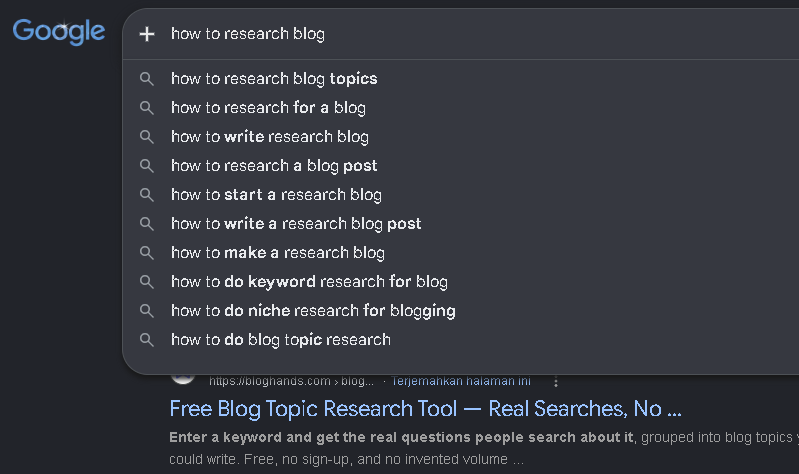
- Google autocomplete and related searches. Type a broad phrase from your topic and note the suggestions. Check the related searches at the bottom of the results page too.
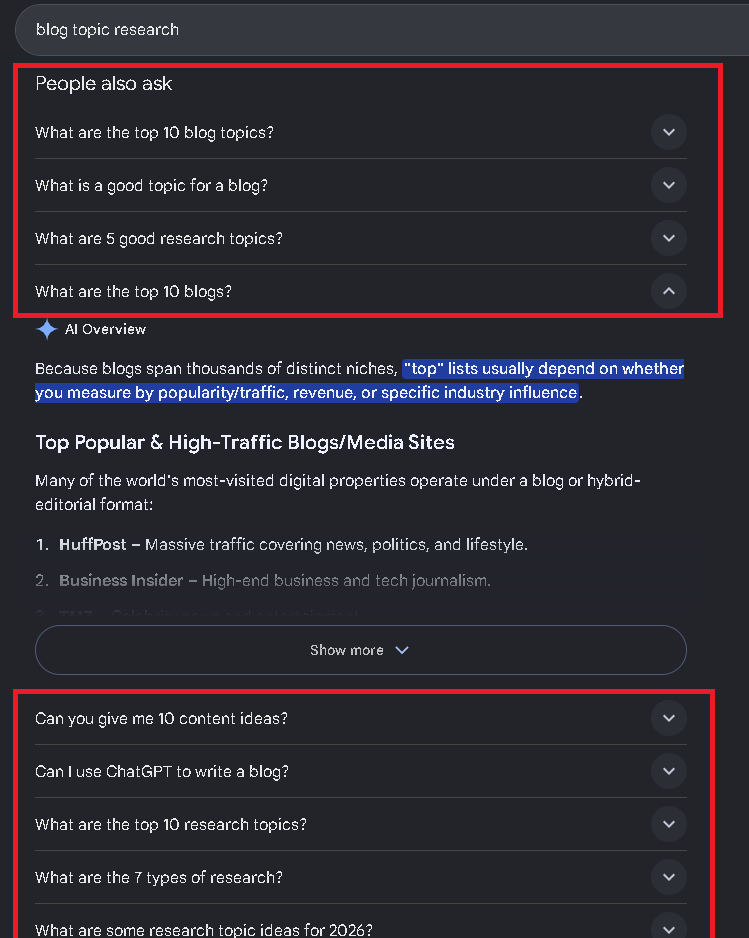
- People Also Ask. When it appears for a query, this box shows questions Google associates with the search. It doesn’t appear for every query, so don’t rely on it.
- Forums and communities. Subreddits, Facebook groups, and niche forums show how people describe their problems in their own words, which often differs from the vocabulary of professionals in the field.
- Your own audience. Comments, emails, and replies to your posts are worth recording if you have them. A new blog may have none yet, and that’s fine.
- Your own learning. If you hit a question while learning your subject and couldn’t find a clear answer, other beginners probably did too.
Google autocomplete can help you discover phrases people search for. If you want to understand how these suggestions are generated, read Google’s explanation of how Google Autocomplete predictions work.
Collecting a question is the first half. The second half is turning it into a topic. A forum post saying “my pothos has yellow leaves and I water every Sunday, what am I doing wrong?” is a single person’s situation. The topic underneath it might be “why pothos leaves turn yellow.” Strip out the personal details and keep the problem.
One caution: a question existing doesn’t mean it deserves a standalone article.
Many questions have almost no search demand, or are better answered as a section inside a bigger post. Step 4 helps you tell the difference.
3. Use Competitor Articles to Discover Missing Topics
Other blogs in your niche show you what readers are being offered and where the gaps are. Pick three to five blogs that cover your subject and read their articles as a reader would, looking for:
- Questions they raise but answer thinly.
- Subtopics a reader would clearly want that the article skips.
- Explanations that are technically correct but hard for a beginner to follow.
- Related problems that the article hints at but doesn’t address.
The goal is to find angles worth covering, not to copy anyone’s titles, outlines, or wording. If your article ends up looking like a reshuffled version of theirs, you’ve added nothing a reader couldn’t already get.
Don’t assume that an older article is automatically weak, or that a newer one automatically beats it. An article from several years ago may still be accurate and well-regarded. Look at whether the information is outdated, whether the examples still make sense, and whether anything important is missing, then decide whether you can do something meaningfully better.
4. Check Whether People Search for the Topic
By now you have a pile of candidates. This step checks whether each one matches how people actually search, and whether it’s realistic for a newer blog.
You don’t need a full keyword research process for this. A light check is enough:
- Look for the phrasing. Do autocomplete suggestions, related searches, or a keyword tool show people using a phrase close to your topic? If your idea is phrased in a way nobody would type, rewrite it in the language readers use.
- Read the results. Search the phrase and look at what ranks. Are the results how-to guides, lists, product pages, or definitions? That tells you what searchers expect, which is search intent. If every result is a product comparison and you plan a beginner tutorial, your article may not match what people want.
- Judge the competition honestly. If the first page is dominated by large, established sites with extensive coverage, a new blog may struggle to compete for that exact phrase. A narrower version of the topic may be more realistic. Without data, treat this as a judgment call, not a prediction.
- Confirm your article fits. Ask whether the piece you’d write would satisfy someone who typed that phrase.
Keyword tools can add search volume estimates and difficulty scores, but those numbers are estimates that differ between tools, so use them as a rough guide rather than a verdict. For the full process, see How to Do Keyword Research for a New Blog in 2026..
5. Check Your Existing Articles Before Adding Another Topic
Before committing to a new idea, compare it with everything you’ve already published or planned. If two articles answer nearly the same question, it’s worth reconsidering whether both need to exist. One stronger article may serve readers better than two pages with overlapping answers.
Ask this of each candidate: is this a new reader question, or a variation of one I’ve already answered? “How often should I water a snake plant?” and “How much water does a snake plant need?” are the same question in different words, so they belong in one article. “How to repot a snake plant” is a different problem and may deserve its own post.
Sometimes the right answer isn’t a new article at all. If your existing guide on watering covers the basics but misses overwatering signs, adding a section to that guide serves readers better than a thin separate post.
When a new article does make sense, plan the links in both directions. The new post should point to related existing ones, and relevant older posts should link to the new one. If you’re still deciding how your posts fit together as a set, the content strategy guide helps with that.
6. Decide Which Blog Ideas to Write First
You’ll likely end up with more viable ideas than time. A simple comparison helps you pick. For each candidate, consider:
- Relevance. Does it serve your audience and core topics?
- Evidence of need. Did it come from a real question or problem, or just a hunch?
- Search potential. Is there a plausible search phrase, and does the intent match your article?
- Distinctness. Does it add something your site doesn’t already cover?
- Effort. How much research and writing will it take, and can you do it well?
- Support for other content. Would it strengthen or link naturally to articles you consider important?
Search potential matters, but it shouldn’t be the only reason you choose a topic. Google’s guidance on creating helpful, people-first content is a useful reminder to prioritize content that serves your intended readers.
If you like numbers, you can rate each factor from 1 to 3 and add them up. This is only a planning aid for making your own thinking visible, not a validated scoring system, and a high total doesn’t guarantee results. Use it to start a decision, and override it when your judgment says otherwise.
Early on, it often makes sense to favor ideas that are relevant, clearly needed, and manageable to write over ones that are impressive but huge. Once you’ve picked one, How to Create a Blog Post Outline That Makes Writing Easier covers the next step.
How To Keep a Blog Post Idea Bank
Ideas you don’t use today shouldn’t disappear. A simple spreadsheet is enough. Useful columns are:
| Column | Example entry | What it means |
| Topic | How to Find Blog Post Ideas | The article you might write |
| Reader question | How do I find topics for my blog? | The problem your article answers |
| Possible primary keyword | how to find blog post ideas | The phrase you want to research on Google |
| Source | Google autocomplete | Where you discovered the idea |
| Content cluster | Blogging / Content Planning | The main subject area the article belongs to |
| Research status | Not checked | You haven’t researched the idea yet |
| Next action | Check Google SERP and competitors | The next task you need to do |
Record where each idea came from. Over time, you’ll be able to see which sources give you useful topics and which ones mostly produce ideas you never use. Scheduling the ideas you select is a different job, and How to Create a Blog Content Calendar That Actually Works covers it.
Common Mistakes When Finding Blog Ideas
- Choosing topics because they sound interesting. Interest helps you write, but it doesn’t tell you whether anyone wants the article.
- Copying competitors. Borrowing titles and structures leaves you with a weaker copy of something that already exists.
- Giving every question its own article. Some questions are better as sections, and some have too little demand to justify a page.
- Ignoring search intent. A well-written article can still miss if it doesn’t match what searchers expect to find.
- Overlapping with your own posts. Similar articles split your focus and confuse readers.
- Collecting forever. A list of 300 ideas you never act on is procrastination in spreadsheet form. Set a point where you stop gathering and choose.
FAQ
Where can I find blog post ideas?
Start with your blog’s core topics, then look at autocomplete and related searches, People Also Ask, forums, reader comments or emails, and gaps in competing articles. Mix several sources rather than relying on one.
How do I know if a blog post idea is worth writing?
It should fit your audience, come from a real question, match a plausible search phrase and intent, and add something your site doesn’t already have. If it fails on several of these, set it aside or fold it into an existing post.
Should every blog post target a keyword?
Not necessarily. Posts meant to capture search traffic benefit from a clear target phrase. Others, such as announcements or personal updates, may serve readers in different ways. If an article is meant to attract search visitors, check the phrasing before you write it.
How many blog post ideas should I plan ahead?
Enough that you never start from a blank page, but not so many that the list goes stale. A shortlist of roughly a month or two of posts that you’ve checked is more useful than a long list you haven’t evaluated.
Conclusion
Pick one core topic from your blog. Collect five ideas for it from at least three different sources, such as autocomplete, a forum thread, and a competitor’s article. Check each against your existing posts and a quick search, then choose one and start researching it properly.